



MyGMC App: Everyday Convenience for Bellefontaine, OH Drivers
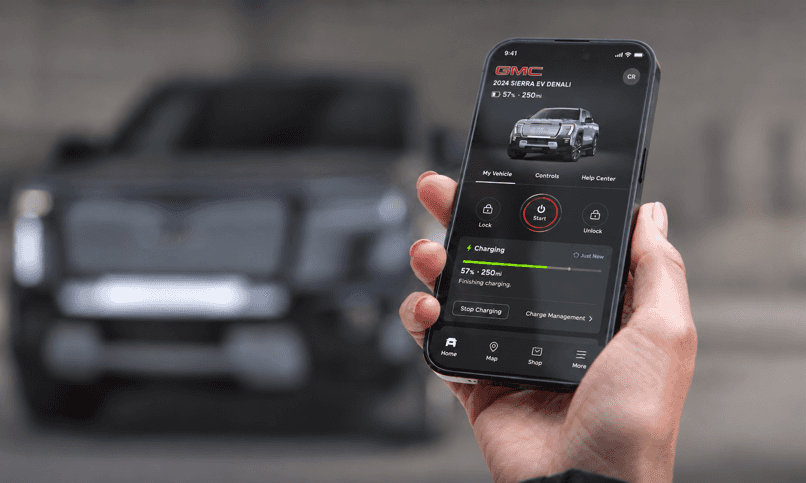
Cold Bellefontaine mornings get a lot more bearable when you can start your GMC from the kitchen table before your boots even hit the floor. That’s basically the whole point of the MyGMC app, and it’s why so many GMC owners around Bellefontaine, Sidney, and Logan County keep it loaded on their phones. This guide covers what the app does, which features apply to your specific GMC, and where Steve Austin’s Auto Group fits in when you need help beyond what your screen can tell you.
What Is the MyGMC App?
The MyGMC app is GMC’s official mobile app, and it connects your phone to your vehicle through OnStar. Once your GMC is properly equipped and enrolled in a connected services plan, the app lets you send remote commands and check your vehicle’s status right from your phone. If you’ve wondered “does GMC have an app” for handling day-to-day vehicle needs like remote start or service scheduling, this is it.
Getting started is simple. Download the app through the App Store or Google Play, or text “GMC” to 56000 for a download link sent directly to your phone. Once installed, sign in using the same GM account email and password you gave the dealer at purchase, since that syncs your VIN and vehicle details automatically. Own more than one GM vehicle, whether GMC, Chevrolet, or Buick? All of them show up across any myBrand app tied to that account.
Key Benefits for Bellefontaine GMC Owners
For drivers navigating Bellefontaine’s backroads or commuting to Sidney, the app’s biggest value is peace of mind. Real-time updates on fuel, tire pressure, and oil life mean you’re never in the dark. Remote lock and unlock settle that nagging “did I lock up?” feeling after you’ve already left. Maintenance alerts flag problems before they turn into expensive repairs, which helps you stay ahead of vehicle upkeep instead of reacting to it after the fact.
Feature Availability: Why It Varies by Vehicle
Not every GMC owner sees the same screen when they open the app, and that’s by design. Services availability, features, and functionality vary by vehicle, device, and the plan you’re enrolled in. Roadside assistance and map features can also shift depending on the country you’re in. It comes down to how different vehicles are built and equipped, nothing more.
Model, Trim, and Model Year Differences
The app works with GMC vehicles from model year 2010 and newer, though remote feature compatibility varies by model. Remote start specifically requires a factory-equipped remote start system paired with an automatic transmission, so an older Sierra with a manual transmission won’t show a remote start button no matter how up to date the app is. Trim level matters too. Higher trims often came with more factory tech built in, which means more options show up in the app later on.
Connected Services Plans and Enrollment
Vehicle access features require an active OnStar plan. Before any remote features activate, you’ll need the app downloaded and a successful login using your OnStar user ID and password. New buyers typically receive a one-month trial of OnStar One, and buyers of pre-owned OnStar-equipped vehicles from 2015 or newer may qualify for up to a three-month trial. Once the trial ends, paid plans for 2025-and-newer vehicles start at $9.99 a month for Connect, with Connect Plus at $19.99 and the full OnStar One plan at $34.99, all before taxes and fees. Owners of 2024-and-older vehicles pay somewhat more for the same tiers.
Model year 2025 and newer GM vehicles come standard with eight years of core OnStar features, covering Automatic Crash Response, remote commands, center display audio apps, voice assistance and navigation. That coverage is tied to the vehicle rather than the original owner, so if you buy a 2025 or 2026 GMC used, the remaining balance stays active for you. If you’re shopping and want to compare what’s included on newer inventory, browse our new vehicles to see current OnStar packages by model year.
Feature access splits between plan status and vehicle type in a few consistent ways:
| Feature/Capability | Compatible Vehicles | Requires Active Plan | EV-Specific |
|---|---|---|---|
| Remote start, lock/unlock | 2010+ GMC with factory remote start and automatic transmission | Yes | No |
| Vehicle Status widget | Properly equipped GMC | Yes | No |
| EV Charge Status widget | GMC EV models | Yes | Yes |
| DEF level monitoring | Diesel-equipped GMC | Yes | No |
| Roadside Assistance request | Most connected GMC vehicles | Yes | No |
| Public charging activation | GMC EV models | Yes | Yes |
Remote Features and Vehicle Status Monitoring
Once your plan is active and your vehicle qualifies, the app opens up tools that make daily driving noticeably easier, especially on days when you’d rather not scrape frost off the windshield.
Remote Start, Lock, and Unlock
GMC remote start lets you fire up the engine from inside your house on a frigid Bellefontaine morning, so the cabin’s already warm by the time you walk out the door. You can also lock or unlock the vehicle remotely and, on properly equipped models, sound the horn or flash the lights to help locate it in a crowded lot. The “locate vehicle” feature pinpoints exactly where your GMC is parked, handy at busy events or shopping centers. You can set boundary alerts and get arrival or departure notifications, and family sharing lets you extend access to up to eight members, useful for households with teen drivers or shared vehicles.
If you’re setting any of this up for the first time, our guide on how to set up and use the GMC mobile app for remote access walks through the login and enrollment steps in more detail.
Vehicle Health and Maintenance Alerts
Beyond remote commands, the app tracks your GMC’s overall health, covering fuel level and efficiency, tire pressure, oil life, and odometer readings. Diesel models get DEF level monitoring, while EV owners get range and charge status instead. You’ll also receive a monthly diagnostic email and scheduled-maintenance alerts, so small issues get flagged before they turn into bigger repair bills. This visibility into GMC vehicle health is one of the more practical reasons owners keep the app active even after the free trial ends.
Service Scheduling and Owner Resources
Once an alert pops up, the app doesn’t leave you guessing. It connects you directly to service support, provided your dealer participates in that feature.
Booking Service Appointments Through the App
You can view diagnostics, schedule service, set a preferred dealer, check for open recalls, and request Roadside Assistance right from the app, assuming your chosen dealer participates in these connected features. If you’d rather book directly, you can also schedule GMC service with our team at Steve Austin’s Auto Group without needing the app at all.
Digital Owner’s Manual and Vehicle Resources
The app also houses a digital owner’s manual, giving you quick access to specs and maintenance guidance without digging through a glovebox. It’s a small feature, but genuinely useful when you’re trying to figure out tire size or fluid type on the fly.
Navigation and Trip Support Features
For vehicles with built-in navigation, the app lets you send destinations straight to the dash before you even start the car. That’s a nice shortcut whether you’re headed through Logan County or over to Sidney. EV owners get added tools for route planning, one-time public charging activation through IONNA, Tesla Superchargers, and Electrify America (with ChargePoint coming soon), and the ability to find, start, and pay at NACS-compatible charging stations. Checking your EV charge status the night before a longer drive takes the guesswork out of range anxiety.
Getting the Most From Your Connected GMC
Beyond the core features, the app includes convenience tools like Wi-Fi hotspot management and a Marketplace for local services. GMC rolls out regular feature updates, so it’s worth checking your app store periodically for the latest version. To get the full experience, make sure you’ve got a compatible smartphone, a stable internet connection, and your GM account login and VIN handy during setup.
If you’re shopping for a used GMC and want to confirm what tech comes standard, take a look at our pre-owned inventory before you buy.
Received a Maintenance Alert? Contact Steve Austin’s Auto Group
GM-Certified Service in Bellefontaine
The app can tell you something’s wrong, but sorting out what to actually do about it is where we come in. Steve Austin’s Auto Group is a GM-certified service provider in Bellefontaine, OH, and our GM-certified technicians work on Chevrolet, Buick, and GMC vehicles for drivers across Bellefontaine, Sidney, and the rest of Logan County. You can see everything our service department handles, from routine maintenance to diagnostics and warranty work, before you book. We carry a BBB A+ rating, and while we’re not BBB accredited, that rating reflects our commitment to straightforward, honest service.
What to Do Before You Call
If your MyGMC app flags a tire pressure warning or oil life alert, start with the basics: check tire pressure manually with a gauge, and confirm the oil life reading against your last service date. If the warning persists or you’re not sure what it means, schedule GMC service with us and we’ll diagnose it properly.
And if you’re dealing with connectivity issues rather than a mechanical concern, reach out through our contact form and we’ll point you in the right direction, whether that’s us or GMC’s own support team.
MyGMC App FAQs
Does Every GMC Model Support the App?
Compatibility depends on model year and technology package. The app supports GMC vehicles from model year 2010 and newer, but remote feature availability varies by model, and older or base-trim vehicles may have limited or no support. Check with us to confirm your specific vehicle’s compatibility.
Is the MyGMC App Free to Use?
The app itself is free to download. On any 2025-or-newer GMC, the core connected features are also included at no cost for eight years through OnStar Basics, which covers remote commands, Automatic Crash Response, navigation and voice assistance. New vehicle buyers additionally get a one-month trial of OnStar One, the top tier, and pre-owned OnStar-equipped 2015-and-newer vehicles may get up to a three-month trial. Beyond that, paid plans currently start at $9.99 a month plus taxes and fees. So the short answer is that on a recent GMC, most of what you’d use day to day is already included.
Can I Get Service Help If My App Shows an Alert?
Yes. If your app displays a maintenance alert, contact your local GMC dealership. Steve Austin’s Auto Group’s service team in Bellefontaine can diagnose the issue and get your GMC back on the road, whether that means a quick tire pressure check or a more involved repair.

0 comment(s) so far on MyGMC App: Everyday Convenience for Bellefontaine, OH Drivers